
Understanding Ineligible Clicks in Google Ads
Understand and manage ineligible clicks in PPC campaigns. Protect your budget and improve ad performance with expert insights.

If you run a Google Ads campaign, you want all of the people who view your ads to be legitimate prospects. Real searches. Real interest. Real potential customers.
But sometimes an ad campaign can receive Google Ads clicks that are malicious competitors who want to waste your ad budget? And what if some traffic is coming from bots?
This is what is known as ineligible clicks or invalid click’s. Most activity inside Google Ads is legitimate, but not all of it deserves a place in your reports. In simple terms, these are interactions Google flags as invalid because they were accidental, automated, or otherwise not genuine. That can include repeated taps, bot traffic, and suspicious patterns tied to IP addresses.
This article describes everything you should know about ineligible clicks.
Invalid Clicks Overview
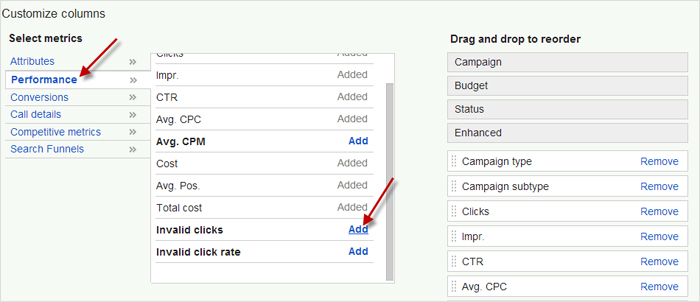
If you watch your site statistics carefully, you probably know it receives its share of spam traffic, especially if you have a comments page. Bot comments are irritating and can fill your inbox and waste time. But what are invalid click’s about?
The term means an action that a bot or person takes where the link you paid for is clicked on by accident or a system did it. Some common reasons for invalid click’s are:
- Mistaken double clicks
- Automated click bots
- Manual clicks by accident or done purposely to drain your budget
- Impressions intended to damage your CTR
Spambots can be really annoying by clicking constantly on the paid link, costing you hundreds or thousands of dollars. When you remember that some popular keywords cost more than a steak dinner for two, it can have a really big effect on your ad budget. A large number of these interactions may fall under invalid activity, especially when patterns repeat across the same IP addresses.
Some malicious competitors may try to damage you by draining your budget. Others may work for click farms who click paid ads as well as social media site posts. Believe it or not, click farms are out there and they are profitable for the site owners.
Or a malicious link could be done by someone with an ax to grind.
How To See Ineligible Clicks In Your Google Ads Account
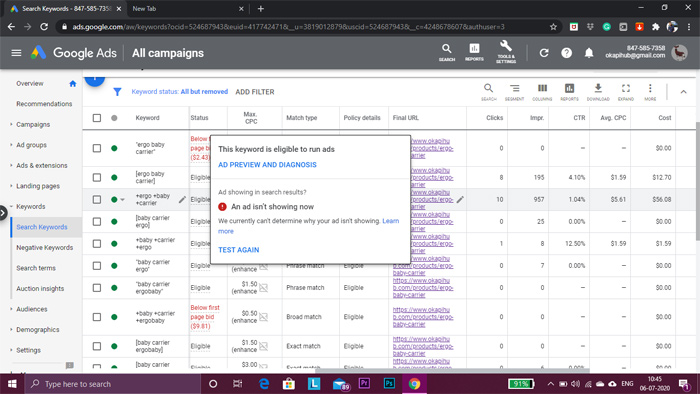
When you first set up your Google Ads account, you have an option to customize data views. The default is ‘people in or who are interested in your target locations.’ This is recommended, but if you don’t alter it, you could have some PPC fraud or abuse going on.
You can change the campaign settings and reduce some of the ineligible clicks by changing your recommended settings. Choose ‘People in your targeted locations.’
Next, if you click Campaigns, you will notice 3 columns. Select ‘modify’ and you can add another status column to see ‘invalid click’s’ and ‘invalid click rates.’ After you add them, you can review in seconds the campaigns that are being hit with invalid click’s
While you are there, review your account settings. One small adjustment in location targeting can reduce wasted traffic. Choosing users who are actually in your target area instead of just “interested” can make a noticeable difference.
Next, break things down by ad groups. If certain ad groups suddenly spike in clicks but show no conversions, something is off. If several ad groups behave the same way, it could point to broader invalid activity.
Google attempts to track invalid click’s and you may see a refund in your account for them from time to time. The refund part of your bill will be noted. You also can see invalid click’s that you won’t get charged for in your ad campaign.
If you manage a bigger account, do not just look at one campaign. Review the entire account to catch patterns that might be hiding across multiple ad groups.
What About Click Fraud?
| Category | Invalid Clicks | Click Fraud |
|---|---|---|
| Definition | Clicks Google considers ineligible because they are accidental, automated, duplicated, or otherwise not genuine. | A deliberate attempt to generate fake ad clicks in order to waste budget, manipulate data, or profit unfairly. |
| Intent | May be accidental or low quality with no clear malicious purpose. | Intentional and malicious. |
| Common Sources | Double-clicks, bots, accidental taps, repeated clicks from the same user, or technical issues. | Competitors, click farms, automated scripts, or bad actors trying to drain ad spend. |
| Impact on Budget | Can inflate costs and distort campaign data, especially when it happens at scale. | Usually more aggressive and financially damaging because the activity is designed to waste money. |
| Examples | Someone taps an ad twice by mistake or a bot triggers repeated visits. | A competitor repeatedly clicks your ads to exhaust your daily budget. |
| How Google Treats It | Google may filter or credit these clicks when they are detected. | Google also tries to detect and filter this, but not every fraudulent click is caught right away. |
Invalid click’s and click fraud may sound the same but they aren’t. The result is mostly the same but the reasons are quite different.
As we have explained, invalid click’s and ineligible traffic are usually caused maliciously or by accident. You’re paying for every click so repeated clicks can drain your account fast.
Click fraud, however, means that the clicks are malicious in nature and want to defraud the site owner or Google. Click farms are definitely click fraud. So would your angry ex-girlfriend who clicks on your website’s ads.
Google keeps track of these behaviors. The platform looks at timing, repeated interactions, and IP addresses to detect suspicious behavior. It has processes set up to shield you from repeat clicks and automated clicks. The search engine watches timings, IP addresses and other questionable activity to protect advertisers.
Google tries to reduce the impact of invalid click’s and click fraud on customers’ ad budgets. But the invalid click’s Google finds and pay you back for are often a fraction of the real cost.
How To Avoid Ineligible Clicks
We’ve gone over what ineligible clicks are, how they happen, and other vital information. Now we’ll detail how to prevent ineligible clicks from damaging your PPC campaigns:
Watch Your Most Critical Ad Metrics
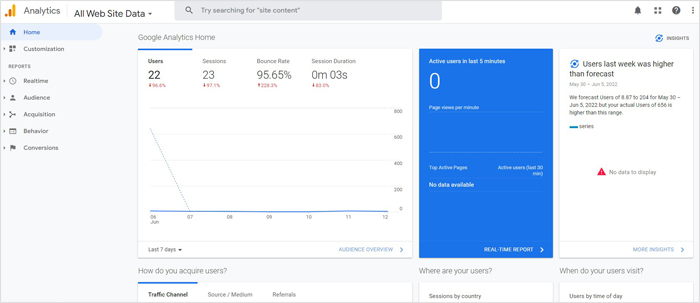
Change your ad campaign stat data by adding several columns that relate to your campaign’s invalid click’s. It’s important to remember that you will not be charged for clicks that Google says are ineligible. However, you can still be paying for bogus clicks that Google missed.
Some site owners purchase a click fraud prevention program that tells you exactly the clicks that are invalid. However, if you don’t want that, it’s possible to find them yourself. But you have to watch and really understand your ad campaign stats. Then you can see sudden spikes and other sketchy activities.
You should carefully go over any time there is a change in your account’s KPIs. Be on the lookout for the biggest sudden changes. Are they explainable or a mystery? For example, a major change could be because of changes you made in your campaigns recently. On the other hand, they could be a sign of a bogus click attack that Google didn’t spot.
Keep An Eye On Display Network
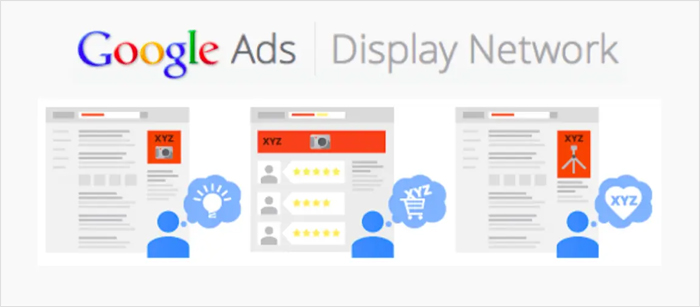
Display network advertisements are one of the most frequent sources of ineligible clicks and invalid traffic. The Google Display Network has many benefits and a lot of vendors get excellent traffic. However, there are too many low-quality sites and sketchy website owners.
They could click advertisements on their own site to make an extra buck and get no results for you. If your ads show on weak sites, you may see a high volume of clicks with zero value. If you don’t remember to block them with an automated solution, it’s your job to review your ad placements and exclude sites that don’t convert.
Review placements often and remove anything that does not convert. At the same time, strengthen your negative keywords list. Well-built negative keywords help prevent your ads from showing on irrelevant searches, which cuts down wasted spend.
Optimize Your Google Ad Account
After you include the most important columns, review the campaigns that are seeing the most invalid click’s. Attempt optimization by going over your settings for keywords and targeting.
Keep your structure tight. Clear ad groups, focused targeting, and relevant messaging make it easier to spot issues early.
Review your keyword list. If you have too many broad or low search volume keywords, your data gets messy fast. Clean it up so you can see what is actually working.
Take a look at your bid strategy. Automation can help, but only when your data is strong. Otherwise, it may push spend toward traffic that looks active but does not convert.
Your ad text also matters more than most people think. If your messaging attracts the wrong audience, you will pay for clicks that were never going to convert. Make sure your landing page matches the promise of your ads so visitors do not bounce right away.
Also, keep an eye on updates. Google Ads regularly introduces new features that can help you monitor traffic and performance more effectively.
Approve the changes and check if the invalid click ratio decreases. Google also says you should pinpoint and improve areas of your account with low conversions.
Ineligible clicks and invalid click’s can be a real problem for advertisers. With the above ideas and tips in mind, you can regain control of your advertising campaign and delete those ineligible clicks.
When to take action
If you notice repeated issues, start documenting everything. Track dates, campaigns, devices, and patterns. If there is a link provided from a tool or analytics platform showing suspicious sources, save it for reference.
Look across your campaigns, especially if you are running more than one Google Ads campaign. Sometimes the issue is isolated. Other times it spreads across the entire account.
Do not panic over small fluctuations. Some noise is normal. But if you see a consistent pattern or a large number of questionable clicks, it is time to act.
The bottom line
Ineligible clicks can quietly drain your budget if you are not paying attention. They distort your data, waste spend, and make it harder to understand what is really driving results.
The fix is not complicated, but it does require attention. Monitor your campaigns, refine your targeting, and keep your ad groups clean and focused. Strengthen your negative keywords, review placements, and stay alert to unusual behavior.
When you do that, your budget has a much better chance of reaching real buyers instead of disappearing into noise somewhere near the first page of your reports.