
How to Take Over Management of an Existing Google Ads Account
Handle Google Ads account takeovers securely. Learn steps to maintain campaign performance and protect your ad data.

Transferring the ownership of a Google Ads account can be a hassle, especially for managers who have so much on their business plate. In addition, it can cause a nuisance both for the business owners and the clients as well.
However, if the process is carried out efficiently, it can add value for your client. A well-managed transition helps protect client accounts, stabilize ad spend, and build long-term trust. And this is especially true if you get the job done right the first time of asking.
In addition, this can lead to a stronger mutual relationship between your PPC agency and your clients. Keep reading as we elaborate:
Why Is This Important?
Did you know, an average person is estimated to encounter over 10,000 Ads across every search engine and platform every single day.
One of the most significant advantages of taking over a client’s existing Google Ads account is that there is already something you can work on.
It does not matter how bad the existing ad campaign is. Taking over an existing Google Ads accounts gives you a foundation to work from.
Still, transitions can feel messy. You are stepping into someone else’s structure, sometimes without full clarity on account access, login credentials, or even who controls the manager account.
When you take over a client’s Google Ads account and start working on it, there’s always a protracted bedding-in period where you align everything according to your way.
Unfortunately, you may get impatient when you don’t know where to start. However, it is integral to remember that it’s all about your relationship with the client.
Before jumping into managing a client’s Google Ads account, the first thing you need to consider is that it’s all about business-client relationships.
In agencies, you cannot build successful relationships with your clients before learning the ins and outs of account management.
However, the steps listed above will help you build successful, long-term relationships with your clients.
Start With What Is Already Provided
You may think that you can impress your client with your initial setup, but this is a common mistake every beginner account manager makes.
Your client will not appreciate all the changes to the old campaign because all they seek are positive results.
Therefore, your client pays you to get positive results without making specific changes to the initial campaign.
But this doesn’t mean that you can’t and shouldn’t make any changes. If you think that your client’s initial campaign requires specific changes to make it better, go for it.
Start by reviewing what already exists inside Google Ads. Even weak campaigns can reveal useful insights about performance across the search engine.
However, if the existing campaign is decent enough, you should not make any changes to impress your client. If something is clearly wasting ad spend, fix it. Just do not rebuild the whole account overnight.
Research And Learn Everything About Your Client’s Business

The most important step to adding value to your client is learning everything about their business.
While understanding the products and services of your clients is equally beneficial, understanding the long-term goals of your clients is way more important.
Ask yourself these questions. Does my client want to go public? Do they want to expand their business to specific demographics and markets shortly?
How does your client perceive the industry landscape? You can better understand the context your client is working on by putting up Google alerts for your client’s brand and that of their competition.
Moreover, you can conduct annual business reviews to illuminate the previous and current goals. Additionally, it will help you elucidate previous strategies that you can still implement.
Use tools like Google Search to monitor competitors and industry trends. You can also track visibility across Google sites where the brand appears publicly.
The more context you have, the better decisions you will make across the search engine landscape.
Install Tracking Before You Start
Tracking is one of the most crucial things you must advocate for. However, when you start a new campaign, always set a specific goal for for-profit and other metrics you need to achieve.
Tell your client that their campaign ad needs to run for at least seven days with the entire tracking installed. This will give you an idea of what the campaign is doing and see which parts should be kept.
Before installing tracking when running campaigns, you may have occasionally received calls from angry clients complaining about decreased leads and sales soon after you launched a particular campaign.
There may have been times where you saw increased conversions and sales from the new campaign, but due to a drop in another source of marketing, it may have made it seem like you were responsible for the decline in leads.
Hence, make sure you take steps to avoid these situations in the future. For instance, installing tracking before launching the new campaign will help you back up your statements when you argue with a client. Without tracking, it becomes easy for clients to misinterpret results across different search engine channels. Without it, you cannot measure performance, justify ad spend, or explain results to clients managing many accounts.
Do Not Make ‘Too Many’ Changes
For instance, you have been running your campaign for a while b just making minor changes. Yet, you have an excellent overall campaign with essential metrics.
However, you notice that a PPC manager changes your campaign’s bidding, structure, and metrics. Therefore, the algorithm of Google Ads will take time to examine whether these new changes will be effective or not.
While you should have the same score as before, even after making a few changes, Google tends to lose a substantial amount of money if your new campaign is not as good as before.
Google Ads relies on patterns. If you suddenly adjust bidding, structure, and targeting, the system needs time to recalibrate. That can temporarily affect results across the search engine.
In addition, there may be a possibility that your audience will click on lesser expensive Google ads. Therefore, if you are planning to make a certain amount of changes to your campaign, make sure you roll them out over tie instead of making those changes all at once. This protects ad spend and keeps performance stable across your client accounts.
Review And Revamp Your Bidding
When relaunching your client’s new campaign, make sure you change the bidding according to the new and existing data. Do not take extra time to rethink whether a specific keyword will receive a higher bid. Poor bidding decisions can waste ad spend quickly, especially when managing multiple client accounts.
Include Your Client’s Best Performing Ads In Your Campaign
Although your client’s old Google ads will not last them much longer and new Google ads will take over, the previous ads may control and enable you to troubleshoot.
Changing the keywords or the entire ad completely may not give you an idea about the source behind a particular problem when the CTR, conversion value, and conversion rates show a significant drop. This helps you identify what works and avoid unnecessary drops in performance across the search engine.
Nevertheless, old Google ads can have a substantial impact on the results of your new campaign.
Review The Previous Keyword List
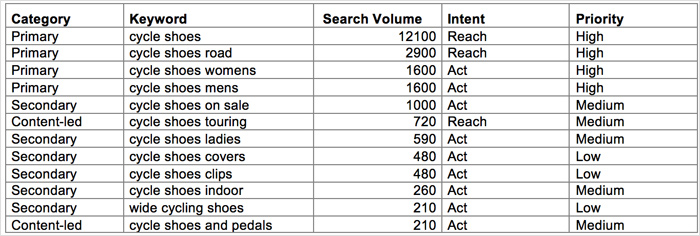
You must reuse your client’s negative keywords list. There are chances your client may have done in-depth negative research for keywords that hold much value for your new campaign.
However, you must avoid copying and passing the entire list as it is. It may deteriorate the performance of your ad if it has a vast range of negative keywords.
Instead, use as much of the existing data, and negative keywords list you think will be enough for your campaign but do not overdo it. Too many restrictions can limit performance across the search engine.
Research shows that 68% of online experiences start with a search engine that has high-quality keywords.
Be Gentle With Old Accounts
Every beginner Google Ads accounts have used broad match for many years with little success. However, there have been cases where specific campaigns have performed better just using broad match.
Google conducts checks on quality keywords for broad match. Ultimately, this means that if you put a broad match keyword, Google Ads will decide whether it is relevant enough.
Therefore, if you open a clint’s Google Ads account that has good quality broad match keywords, be considerate when including broad match keywords because it is unpredictable whether you will get the same results or not.
Give Full Access To Your Clients
When managing a client’s Google Ads account, make sure to communicate on daily, weekly, or monthly reports.
For instance, if your bid modifier for a specific location produces a higher ROI, send your client an email right away.
Communicating with your clients ad keeping them updated is key to building successful, loyal relationships.
Make sure clients have proper account access, visibility into reporting, and clarity on who controls the manager account. If needed, confirm MCC access and ensure all permissions are set correctly. This is especially important for businesses managing many accounts.
Keeping your clients in the loop will build trust and prevent them from wandering into their accounts, making assumptions about how well the advertiser is handling the account.
However, some clients can be challenging to deal with, and once they are disappointed with something, it gets tough to turn things around.
Sending performance reports to your clients is a great way to keep them I the loop. Additionally, make sure you grant them full access to any services or tools you use to run the campaign.
For example, PPC accounts and site analytics. Finally, staying clear ad transparent with clients is a great way to build trust.
Clients can explore the tools you use to understand better how you are making things work.
Discuss The Expectations And Goals Of Your Campaign
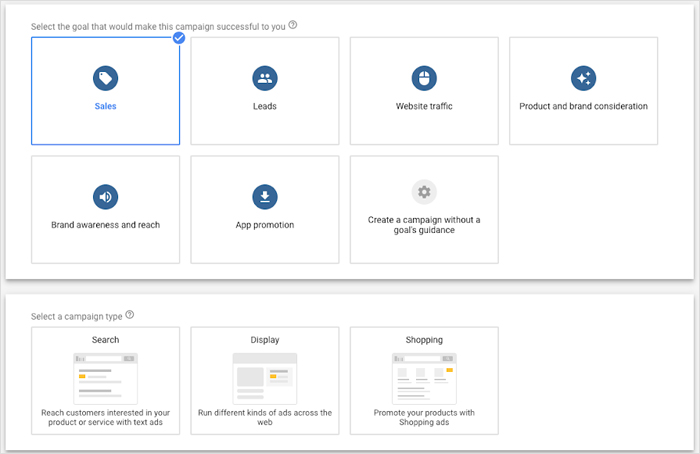
It is essential to openly discuss the goals and expectations of your campaign with the client. Hear out what your client expects from the campaign and present them with suggestions accordingly.
Remember, the conversation needs to be honest. It is terrific to lower the expectations of your client. However, it is better to tell them everything honestly when setting goals for the campaign rather than justifying why it performed a certain way later on.
Don’t let your clients get locked into unrealistic goals. Instead, explain the entire process of investigating and researching the account across the search engine to your client.
The client may have higher expectations, assuming that you will quickly take over the account that the previous marketer left. Once, it is essential to elucidate your approach towards the campaign.
Suggest Your Strategies
It is essential to address that every client is different. For example, you may be appointed by an organization with an entire marketing team to lend a little helping hand.
On the other hand, a single person could also hire you to help them with their campaign. In both cases, do not leave your creativity behind.
You may likely have a better idea for the client’s campaign to move their marketing strategy to the next level. Look for ways to improve results, reduce wasted ad spend, and strengthen performance across their client accounts.
Strategy is what separates great managers from average ones.
Spend Extra Time On Keywords
It would help if you spent extra time on keyword research. You must know what keywords perform better and generate the majority of your results and conversations across the search engine.
Strong keyword strategy improves efficiency and reduces wasted ad spend.
Moreover, it is vital to address keywords that you think are hurting the performance of your campaign. Conduct extensive keyword research.
Remember, there’s always a possibility of valuable keywords that the old agency could not target.
Final Thoughts
Every time you get a new client, you have a fresh opportunity to begin from. A new client means you have a new and better chance to generate revenue for your advertising agency or you as a marketer alone.
Moreover, it can provide you with a unique learning experience as a marketer.
However, it can be hard to manage things when taking over a client’s Google Ads account. For example, you may inherit messy setups, unclear billing setups, or even security risks. Today, issues like phishing emails, phishing scams, and phishing attempt tactics are becoming more common. These are often carried out by threat actors trying to gain access to accounts. If successful, they can run malicious ads or fraudulent ads, draining ad spend quickly. This is especially true if they violated terms of service (even unwittingly) and got the client’s Google Ads account suspended. Some businesses have lost tens of thousands before realizing what happened.
To stay protected:
- Use two factor authentication
- Monitor unusual activity
- Avoid suspicious links or requests for login credentials
- Verify everything through official Google sites
If needed, you can also check guidance from the Google Ads community team, but always prioritize securing your own systems first.
Take your time to understand the intricacies of the new account. It is essential to maintain a good relationship with your client to run the campaign successfully.
Follow the steps above to effectively manage a new Google Ads account and take your marketing portfolio to the next level!