
Why Aren’t My Google Ads Showing & What to Do About it
Troubleshoot why your Google Ads aren't showing and resolve common issues quickly to restore visibility and campaign performance.

So, your company is paying big bucks for Google Ads, but your Google Ads not showing in search has you wondering what went wrong.
However, this isn’t always a problem.
But if you don’t see them with the Ad Preview tool or Google’s Ad Preview feature, something’s wrong.
Fortunately, there is usually a good reason your Google ads don’t appear.
Below, we delve into the most common causes for Google Ads not showing and what to do about it.
Some of the reasons they don’t show are technical or administrative issues, while others are tied to ad rank, ad auction, or ad visibility issues within your campaign settings that affect whether your ads appear in search results.
Your Payment Didn’t Work
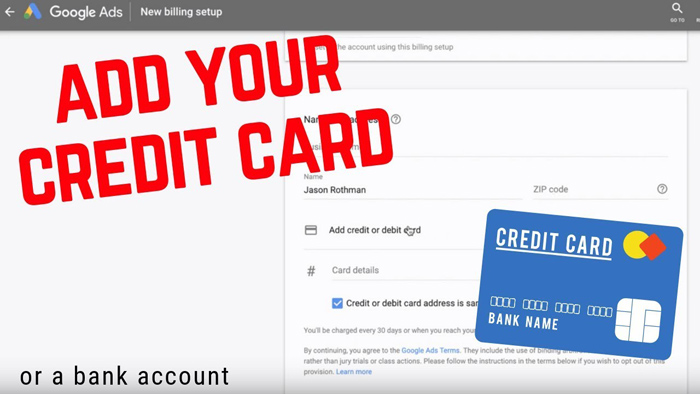
Most Google Ads account holders pay for their ads with automatic credit card or debit payments. Google charges the account when you get to your payment limit or threshold. It also will charge your card at the end of the month’s billing period.
For your transactions to be processed, the payment details on your card need to be up to date. If Google can’t charge your card, your ads will stop running — one of the most common reasons Google Ads aren’t showing.
This is one of the most common reasons for Google Ads not showing or not running. So make sure your payment information is accurate when setting up your account. Many account holders also have their credit card expire and they forget to update the information.
Double-check your billing information and ensure your card hasn’t expired. Even small errors in payment setup can pause ad delivery until resolved.
Low Search Volume
If you see ‘Low search volume’ in your account, you probably target long-tail keyword’s that few searchers are looking for. While targeting long-tail terms can sometimes pay off, keywords with very low search volume can stop your Google Ads from showing.
Your ad rank plays a key role in whether your search ads appear. But this won’t happen if they are stopping your Google ads from showing up. The ad auction depends on multiple factors — low bids, low-quality ads, or poor ad relevance — Google Ads may choose not to display them, and your ad groups might lose visibility.
You can fix the problem by regularly checking your Google Ads dashboard to see if any of your keywords have been marked as low-volume. In some cases, using a broader or more commercially focused keyword can improve visibility in search results. Make sure your keyword list aligns closely with your ad copy, target audience, and ad scheduling preferences. If necessary, raise your bids to stay competitive.
Balancing specific and high-intent phrases ensures your google search ads stay active and eligible in the ad auction.
Remember: ad rank depends on your bid amount, quality score, expected click-through rate, landing page experience, and how well your ad matches the searcher’s intent.
Ad Quality and Relevance
Google Ads also evaluates relevance between your ad and the search query. Relevance is one of the most powerful drivers of your ads performance. If your ad experience or relevance is low, your ad rank will drop, affecting ad visibility.
Focus on strong messaging that matches what your audience is searching for. Use the Ad Preview tool to see how your ads appear in search results and adjust accordingly.
If you’re using exact match keywords, ensure they closely align with your ad message and target intent. This helps your ad groups perform better and improves overall engagement. If your ad doesn’t match what your target audience is searching for, revise the message to better address their needs and intent.
For example, if one ad group focuses on “Google Ads management services,” don’t mix it with unrelated topics like “SEO consulting.” Doing so can reduce your quality score, lower your ad rank, and limit visibility in results.
Each ad group should contain:
- Highly relevant keywords (checked for keyword search volume)
- Tailored ad copy
- Landing experiences that match user intent
- Cohesive landing page content
This clarity improves performance during the ad auction and boosts engagement over time.
Landing Page Isn’t Performing
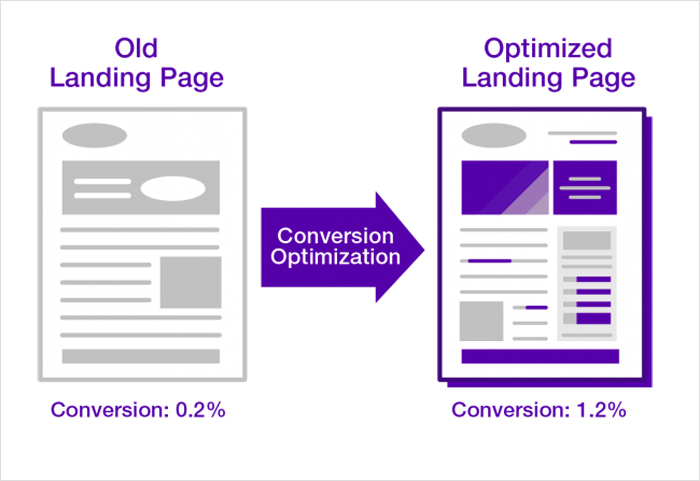
Google evaluates ads based on how relevant they are to what the person is searching for. Google Ads also evaluates your landing page experience and landing page content. But it also judges by how relevant your landing pages is to the ad and keyword. If your landing page experience is poor, not optimized, or if it doesn’t match what users expect after clicking your ad, your Google Ads not showing may result from lower performance.
Solve the problem by examining the targeted keywords you target and thinking about what the searcher is looking for.
What are the questions the searcher has? What is causing their problem? What are they looking for to solve their issue?
A high-performing page should answer user questions, offer value, and connect directly to your ad promise. The stronger the relationship between your ad and landing page, the better your results will be.
Make sure your page loads quickly, uses the same messaging as your ad copy, and is optimized for mobile users.
Some advertisers simply don’t put enough time, effort, and research into the quality of the landing pages. But this an essential part of successful campaigns.
Remember, your landing page is not just a destination — it’s part of your ad’s quality score calculation. The more relevant and user-friendly it is, the better your ad rank and the higher your visibility in auctions.
Negative Keywords
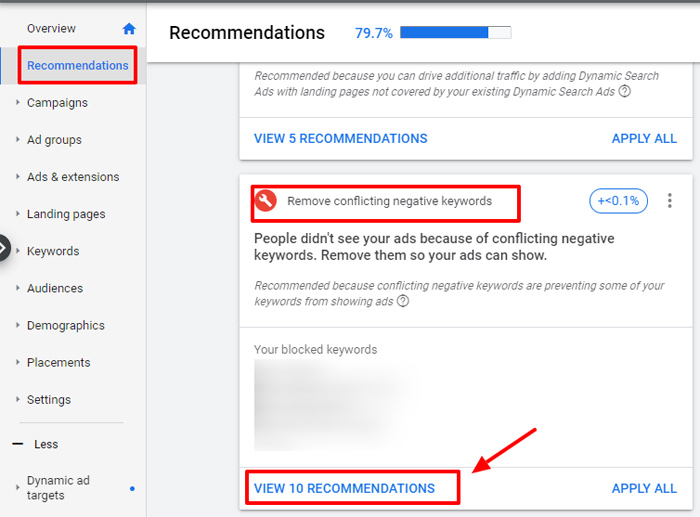
Using negative keywords in your ad campaigns ensures you don’t spend money on undesired search traffic. But be careful when you set up negative keywords with broad match modified. If you add conflicting terms, they might block valuable impressions.
For example, adding an exact match negative keyword can accidentally block a valuable phrase that’s closely related to your target audience.
To prevent this, check the negative keyword list and ensure that you don’t have any that cancel out keywords in any ad groups, and periodically review your search term reports to catch new opportunities. Keeping these clean ensures you’re exclusively advertising to users who are truly interested in your offer.
Low Keyword Quality Score
Your keyword quality score is a key performance metric in every Google Ads account. A low score signals to Google that your ad or landing page content doesn’t align well with searcher intent.
Google assigns a quality score (1–10) based on:
- Expected click-through rate (CTR)
- Ad relevance
- Landing page experience
When your score is low, it reduces your ad rank and makes your Google Ads aren’t showing for valuable searches — even if you’re bidding competitively.
To improve, start by grouping keywords more strategically. Each ad group should have a focused theme. Write ad copy that matches the keyword intent exactly, and optimize the corresponding landing page for relevance.
Over time, you’ll notice improved CTR, lower CPC, and better placement in the ad auction.
Ads Were Paused, Disapproved Ads, Or Removed
Sometimes your Google Ads simply aren’t active. They may be paused, disapproved, or removed.
If that’s the case, check your ad groups and look at the ad status in your Google Ads campaign dashboard.
- If the ad or ad group is paused, re-enable it.
- If it’s disapproved, review Google’s ad policies and make necessary edits.
- If it’s removed, you’ll need to recreate it.
Keeping an eye on your Change History ensures you catch these small but impactful changes early before your Google Ads aren’t showing again.
You may need to review Google’s ad policies.
Review Geo-Targeting And Language
If your Google Ads focus on a geographic location outside your area or have mismatched language settings, your Google Ads aren’t showing in those markets.
Also, if your campaign focuses on only a specific audience, visibility may be limited. Check your campaign settings and make sure your the ads are targeting the right users.
This is particularly important for businesses exclusively advertising in niche markets — even small targeting errors can mean missing a large portion of your audience.
Account Is Under Review
Sometimes Google will review ad accounts. This is for security, and the search engine will check that your billing information is accurate. During this time, your Google Ads aren’t showing.
Good news – the process only takes two or three days, then your ad status will show again. During this process, your Google Ads not showing is normal.
However, account reviews are part of Google’s business, so there isn’t anything you can do but wait.
If, for some reason, your Google Ads campaign is reviewed for more than three days, you will need to contact them.
Exceeded Daily Budget
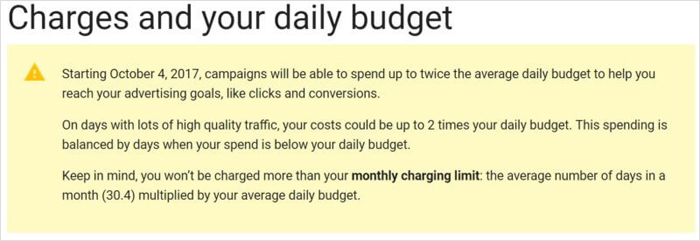
Depending on how you have planned your Google Ad campaign, you could run through your ad budget too fast. For instance, some Google advertisers set up their ads to deliver quickly, which can lead to limited ad visibility.
If the ad campaign shows ‘limited by budget,’ it means your ads may not show because of your CPC compared to the allotted budget. Google Ads will try to spread the budget over the day for the best performance. So, your ads will not show each time a person looks for your keywords in Google.
Review the Ad Schedule Tab in your Google Ads dashboard— your search ads may not show at all hours. Adjusting your ad schedule can help you reach users during high-engagement times.
If your campaign shows “limited by budget,” either raise your budget or lower your bids to stay competitive in the campaign.
Display Ads and Broader Campaigns
If you’re using Google Display Network ads, the Display Network Tab in your dashboard provides insights into placements and performance.
Display campaigns operate differently from search ads, relying on contextual placements and audience signals rather than keyword triggers.
To improve performance, ensure your ad groups and ad scheduling align with your brand’s visual campaigns. Target users at the right time and on the right platforms. Misalignment can easily result in your Google Ads aren’t showing across placements.
Regularly analyzing data from both search and display campaigns helps refine your targeting and maximize visibility across all networks.
Final Thoughts
There are many reasons for your Google Ads not showing — from billing issues and account reviews to ad rank, ad auction performance, or ad group configuration.
The good news? Once you pinpoint the issue, it’s usually easy to fix.
Regularly review your Ad Preview tool, ad status, and Ad Schedule Tab to ensure your Google Ads performing effectively and visible in search results.