
How to Perform Keyword Research with Google Ads Keyword Tool
Master keyword research to enhance PPC campaigns. Target high-value terms and boost ad performance with precise strategies.

Keyword research is crucial to online marketing success, because keywords still govern the way people find information online. Keywords help us accurately find the information that we are looking for among the flood of information on the Web.
As such, proper keyword research with quality keyword research tools allows you to understand what set of keywords consumers are using to find what they need. It also allows you to refine keywords for an SEO campaign based off key metrics such as search volume ranges, competition, and seasonal demand.
But with all the free keyword research tools available out there, which one should you use?
Here’s a hint: Marketers are vying for a prime spot on Google search results. Doesn’t it make sense to use a keyword tool owned by Google?
Why Use the Google Ads Keyword Tool?
Google’s own Google Ads Keyword Tool (now known as the Google Keyword Planner) is one of the best keyword research tools available. This is largely due to the fact that most other keyword research tools pull search volume data directly from Google’s tool via API. While 3rd party tools often do a better job of displaying Google’s data and combining that data with other data to present proprietary or unique insights, they are broken as often as Google changes its keyword planner (which, lately, has been daily).
Since most 3rd party free keyword platforms draw on data from Google’s keyword tool, my experience with them has been one of unreliability. Furthermore, the proprietary data insights that are often provided by 3rd party keyword research tools are often misleading, inaccurate, or downright useless.
Add in the fact that Google’s keyword tool is a free tool, and you have a compelling case. Let’s take a close look at this powerful Google Ads platform feature and how to use it for your PPC campaigns.
The Google Ads interface
In recent years, Google Ads Keyword Planner interface has gone through several transformations, but the latest has resulted in a cleaner and simpler-to-use interface.
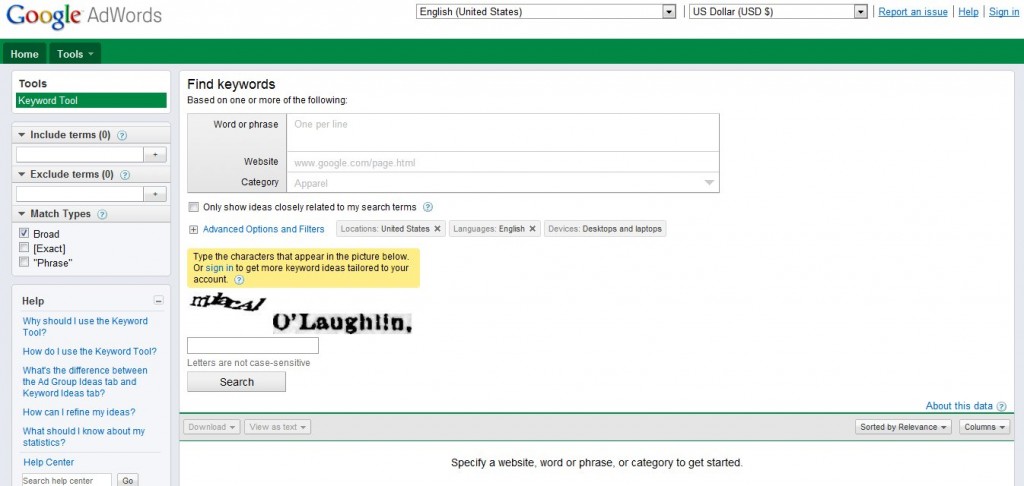
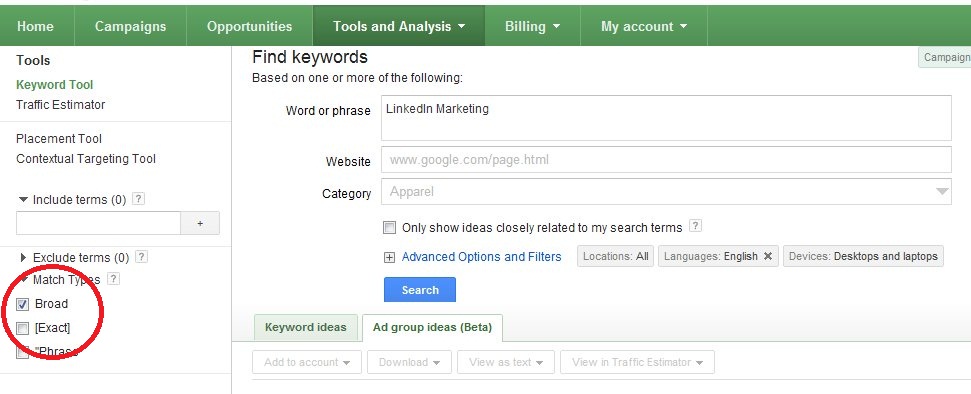
On the main interface is the word or phrase box, where you type the given keyword you’re researching. Right below it are Website and Category.
Right below the main box on the interface is the Advanced Options and Filters feature, which lets you more specifically target your research to certain countries, languages, and devices from which traffic is coming.
On the left are several features that let you customize your keyword list by choosing broad, phrase, or exact match types.
Step by step: Zeroing in on the right keywords
For the sake of illustration, I’ll walk you through the steps on how to do research for keywords based on Exact Match, which I recommend using for SEO campaigns.
Let’s say you’re gunning for “LinkedIn Marketing”.
1. Type “LinkedIn Marketing” on the Word or phrase box.
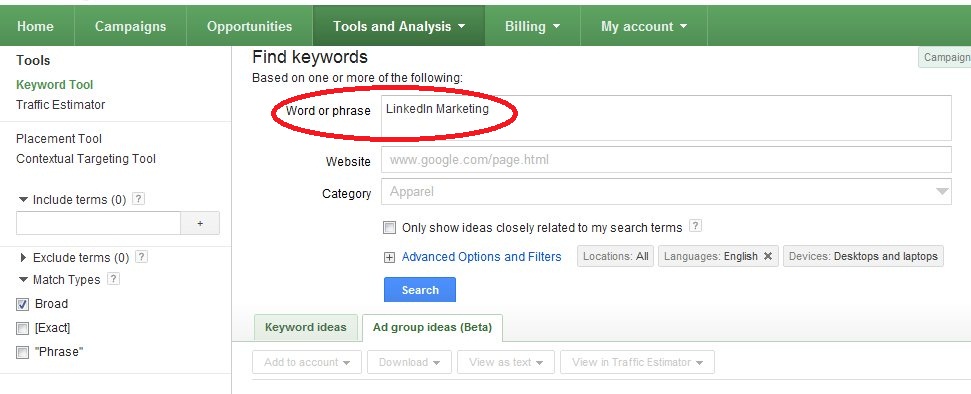
2. You can leave out category for the keywords we’re using here, but for accuracy, I recommend you choose the most appropriate category for the keywords you’re researching.
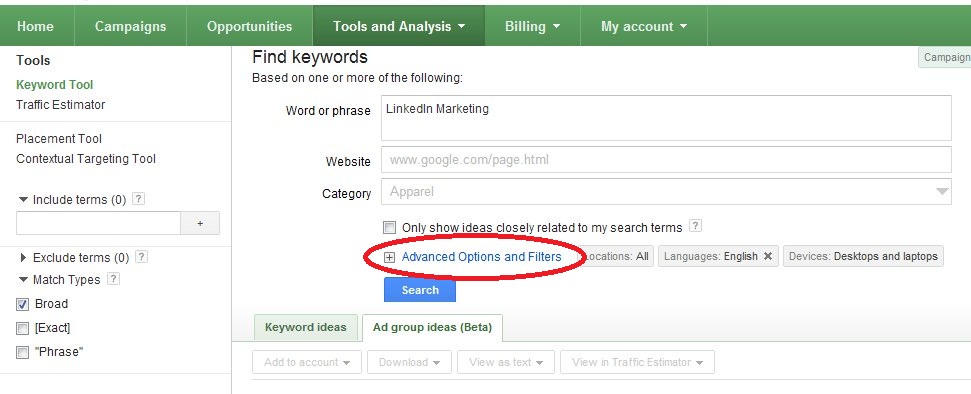
3. Click on the Advanced Options and Filters feature.
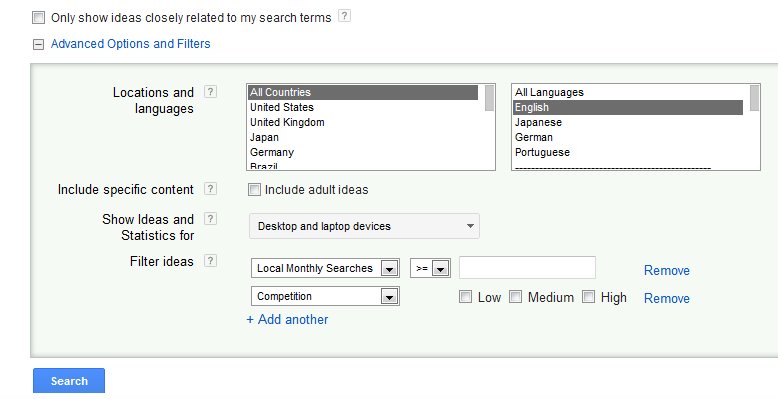
- Choose the country you’re targeting
- Select the language
- Select the device you wish to know where traffic is coming from
- Be sure to include information such as search volume, competition levels, and average monthly searches
4. On the left hand side of the page, select your Match Type:
- Select “Broad” if you wish to see how “LinkedIn Marketing” is broadly used on searches
- Select “Exact” if you wish to see the numbers for “LinkedIn Marketing” using exactly those terms
You can also discover new keywords or find keywords that are related keywords to your seed term using the generate keyword ideas function. This tool will present keyword suggestions and related search terms to expand your keyword list.
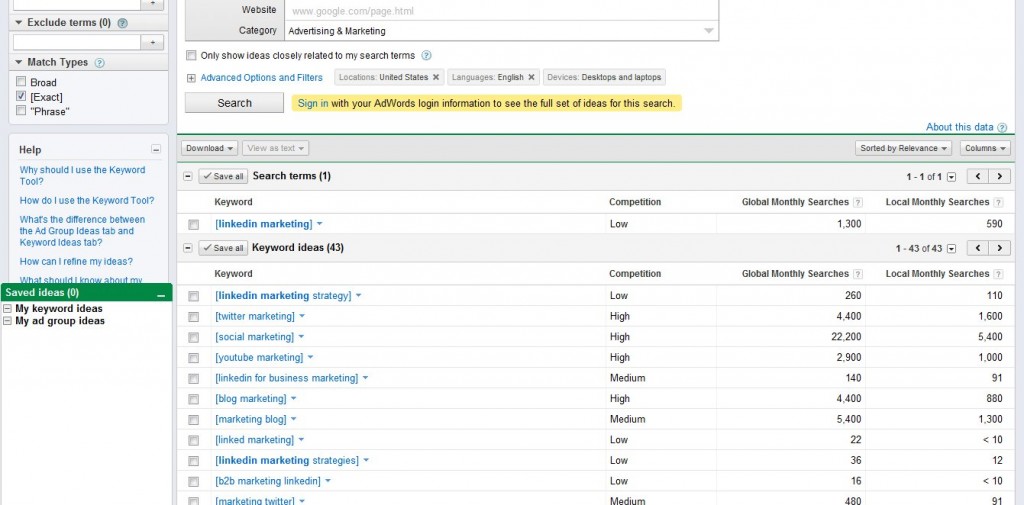
Interpreting Your Keyword Results
Now it’s time to move on to the next phase of the research – gleaning information from the results.
The Keyword Ideas section shows the main keywords, i.e. “LinkedIn Marketing” along with new keywords, variations, competition levels, and search volume.
The Keyword Ideas table shows results for the main keywords and its variations. In the case of Exact Match, the column shows the exact set of words or phrases consumers use type into search engines to learn about “LinkedIn Marketing”.
The Competition column shows how competition looks whether it’s Low, Medium or High. Aim for low range competition keywords for faster results. However, Medium or High competition keywords may still be valuable for long tail keyword research and pay per click advertising in long-term campaigns.
The Local Monthly Searches column shows the average number of searches for the keywords in a specific country or region in a typical month. Global Monthly Searches, on the other hand, shows the average number of people worldwide looking for information on “LinkedIn Marketing”.
The page bid feature offers cost per click and per click range estimates, showing how much advertisers typically pay for paid ads on those terms.
To organize keywords, you can download the results as a CSV file and sort by search volume, competition levels, or cost per click. You can then access keyword planner features to save keywords, refine keywords, or use keyword data for specific search campaigns.
By regularly reviewing your keyword tracking data and use Google’s tools to discover new keywords, you’ll be able to find keywords with the best chance of ranking high in Google search results.
Combining Keyword Planner with Other Tools
Combine insights from Google Keyword Planner with data from an SEO competition comparison tool such as my personal favorite, Market Samurai (that’s an affiliate link – thank you for clicking, if you do!).
This integration allows business owners to compare their site’s performance against competitors and determine whether their PPC keywords and free keyword research strategies align effectively.
If your website metrics stack up well against the competition, go for it. You can also try keyword magic tool or great alternative software options to use keyword insights more creatively.
This feature makes the Google Ads Keyword Planner one of the most practical free keyword research solutions available to generate keyword ideas and discover new keywords easily.
Conclusion
The Google Keyword Planner (formerly Google Ads Keyword Tool) remains an excellent option for keyword research and PPC campaigns.
While it doesn’t give exact numbers (no free keyword research tools can), it provides reliable additional information about popular keywords, relevant keywords, and keywords related to your topic.
It’s clean, simple, and effective. When combined with keyword tracking, search volume data, and competition analysis from search engines, it offers the best chance to select profitable PPC keywords and free keyword opportunities.
If you want to learn how to find keywords and optimize your Google Ads campaigns, contact us today to make the most of your Google Ads account and start building successful search campaigns.
To find out more about keyword research and how to select the right keywords for your business’ PPC or SEO campaign, contact us!
Car rental services live and die on keyword precision — the gap between “car rental” and “car rental near [airport]” is the gap between wasted budget and a booking. Our PPC guide for car rental services covers building out that keyword strategy layer by layer.