
How to Set Up Facebook Retargeting
Re-engage your audience and boost conversions by mastering Facebook retargeting strategies that deliver impactful results.

From its origins as a digital yearbook for Ivy League students in 2004, Facebook has indeed come a long way.
For instance, nobody could have envisioned that nearly 20 years later, it would supplant TV as an advertising platform for a fraction of a cost.
For many brands, this shift is at the center of modern digital marketing, where every click can be measured and optimized inside a marketing funnel.
From the exclusive enclaves of Harvard–and later Yale and Stanford–today’s Facebook users are estimated to be nearly three billion from all corners of the globe.
Now, businesses may think that the primary purpose of creating a Facebook pages is to get as many likes or follows as possible. So, their marketing strategy is designed to achieving this goal.
After that, they no longer have any idea of how to get their followers to take the next step toward dipping into their pockets for their wallets.
The fact is that more than 9 in 10 of your visitors have no intention of buying. It is now up to you to convince them otherwise.
Sure, it is nice to see the number of followers tick up, and you may enjoy bragging rights over their competitors. But your social standing will not impact your profits in the long run unless you do something.
And that is where Facebook Retargeting ads comes in.
Instead of advertising to cold audiences, retargeting ads help you reconnect with users who already interacted with your brand. A strong Facebook retargeting strategy moves those users through a structured retargeting funnel designed to convert warm traffic into paying customers.
What is Facebook Retargeting?
When you are personally managing your Facebook advertising/Facebook retargeting ad, you may have an idea of who your customers are based on their profiles. But do you know the reason why they visited your website or Facebook page?
You might say because they are paying customers.
How much are you betting that your assumption is correct? Are you willing to wager your company’s fate? Scratch that. You do not need to make that bet because it is essentially what you are doing anyway.
Make sure that the data supports your assumption if you are going to mortgage your future.
How can you convert them into loyal customers rather than one-time customers?
Facebook retargeting ads is an invaluable tool that will help identify the people who visited your website and then study their data to spot patterns and intent and group those users into retargeting audiences.
You can then use this data to create compelling retargeting ads to make them revisit your site and make a purchase.
Unlike broad paid ads, Facebook retargeting ads focus only on people who have already shown interest. That’s why they’re often more cost-effective and convert better than traditional remarketing ads or cold targeting campaigns.
Facebook Retargeting ads can help your company in a myriad of ways.
- You can reach out to your website visitors who are already familiar with you. It means you cut straight to the chase because you skip the awkward introduction stage.
- You can target your ad to potential customers who have already visited your Facebook page, your website visitors, or installed your e-Commerce app.
- You can customize and personalize the Facebook ad to your audience, which makes them more likely to engage.
- Reach out to your loyal customers again, even as you continue to implement your marketing ad campaign to lure in prospects. Businesses typically take for granted their long-time patrons for because they think these customers will always be there. If you do it correctly, your loyal customers could serve as your brand ambassadors without having to spend a single dollar on marketing.
A smart retargeting strategy ensures you nurture users instead of overwhelming them. When structured correctly, your remarketing campaign guides users step by step through your retargeting funnel. Think of this as the “middle and bottom” of your marketing funnel, where you focus on persuading target users who already showed intent.
Where Do You Start?
The first step is preparing a list of the prospects you want to target.
This is the foundation of every best Facebook retargeting strategy.
Creating the list is quite easy because there are multiple tools you can use, such as analytics, visitor profiles on your website, or your brick-and-mortar store. You can also gather data through your customer relationship management software, as well as from mobile apps (app activity, installs, or in-app actions), which helps you reach target users at the exact stage of your marketing funnel where conversions happen..
Inside Facebook Ads Manager, you can create custom audiences using the following formats before you can upload them on Facebook:
- Email — Facebook only records the list when you write the email addresses in three different columns. Each cell can only accommodate one email, but it accepts both the US and universal formats.
- Phone numbers — When you write the number, you need to include the country code. Facebook will only accept three phone numbers. You can also write the numbers with or without punctuation. Even if you are audience in your country, do not forget to include the country code before each phone number.
- Facebook User ID — You can also use the customer ID in preparing your retargeting list. It can be a name or a numerical value as long as it is included in Facebook’s database.
- First nameorlast name — Facebook will also accept your list even if you only list the first name or last name of your audience. In fact, if you are too lazy to write the full name, an initial will do.
To create Facebook retargeting audiences, go to Audiences inside Ads Manager and select Custom Audience. Your custom audience may also be identified by the country/city/state/provide where they are based. The Zip Code may also be entered as an identifier, along with the birth date and gender.
When creating retargeting audiences, divide users into clear audience segments, such as:
- Product viewers (last 7–14 days)
- Cart abandoners
- Past purchasers
- High-value buyers
Each custom audience becomes part of your broader retargeting audiences structure.
You can also build a Facebook remarketing audience based on users who interacted with a person’s Facebook account connected to your business assets.
Refining your target audience into smaller remarketing audiences improves relevance and reduces wasted spend.
Install Facebook Pixels
You can launch your Facebook ad campaign using the Facebook Ads Manager tool.
But first, you need to install the Facebook pixel to enable Facebook retargeting. It is a small modification to your code, which is a powerful tool to track users and their online behavior after interacting with your brand and feeds that data into your Facebook Ads Manager account. This matters even more if your business uses mobile apps, because you can retarget people based on app events—like installs, trials, or purchases—in addition to website activity.
Once they click on your ad, added an item to their cart, or visited your website, you ensnare the customer in your web of omnipresence.
Even if they leave, you can follow the cookie crumbs to easily track them across the Internet.
Everywhere they go, they will be reminded of you, like the one that got away, or perhaps an itch on their back that they could not reach to scratch.
The pixel allows Facebook algorithms identify high-intent potential customers and assign them to relevant retargeting audiences.
Without it, your retargeting campaigns cannot function effectively.
Installing the Facebook pixel is quite straightforward. Before anything else, you need the following elements:
- You have a business website
- You have access to your website’s source code
A. Creating a Facebook pixel
- Go to your page’s Events Manager
- Select Connect Data Sources, then click on Web
- Pick Facebook Pixel code, then Connect
- You can then add your name
- Enter your site’s URL to simplify the setup, then click Continue
B. Add the Pixel
The next step is to add the pixel code into your website’s source code. You can choose to do it manually, use a partner integration, or email the instructions to your website administrator or engineer.
Generally, you only need one pixel across multiple business sites.
But there are times when you need to add multiple pixels, like when there are two separate ads on your website. The marketing agencies may decide to run separate pixels for their dynamic ads.
Facebook Retargeting Using Dynamic Ads
If you run an eCommerce business, catalog ads and a dynamic product ad should be central to your Facebook retargeting strategy.
A dynamic product ad automatically shows users the exact products they viewed.
To set this up:
1. Head on to Ad Creation to create your dynamic ad. Make sure to select the audience who already interacted with your services and products on Facebook or other platforms. You can then retarget them first.
2. Next is to select your retargeting option. There are multiple ways to do this.
- Those who viewed your products but did not make the final push to purchase. You can then promote your products to these users.
- Those who added to cart but did not make a purchase. Promote related products from your catalog to retarget these types of users.
- Custom combination. By using this option, you can further filter the type of custom audience you want to target. For instance, you can choose to promote your products to the users who viewed your products for the last 20 days and exclude those who have clicked on your item for the past two months.
- Upselling your products. In marketing parlance, upselling is offering them a more expensive item in your catalog to make even more profits.
- Cross-selling your products. Unlike with upselling, you are trying to push similar items in your product lineup, which you think the audience will be interested in. You can determine interest by their browsing history.
3. There is an option to identify the number of days where the last audience activity was recorded. Enter your answer.
4. Show Advanced Options if you want to include Lookalike Audiences in your Custom Audience targeting. Lookalike Audience refers to that underserved segment of potential buyers who share similar intent and goals with your existing customers.
Catalog ads are powerful because they personalize the shopping experience at scale.
You can experiment with multiple ad formats, including carousel ads and video ads, to increase engagement.
Strong ad creatives, persuasive ad copy, and optimized landing pages significantly improve conversions in both remarketing ads and broader retargeting campaigns.
Create a Catalog
Once your custom audience is ready, go into Facebook Ads Manager to begin creating ads. The catalog is necessary to create your Dynamic Ads.
The catalog is a repository of all your products that you want to advertise on the platform. Facebook retargeting ads recommends creating a single catalog rather than different inventories to minimize confusion.
If you already have an eCommerce website from Shopify, you can integrate it seamlessly into your ad campaign. If not, you will have to create your business Catalog.
You click on Commerce Manager to get started.
With retargeting campaigns, you can tailor your ad according to the specifications of the customer.
For instance, you can target prospects who visited your website or competitor sites as they browse for products that interested them.
The question is, why did they not convert?
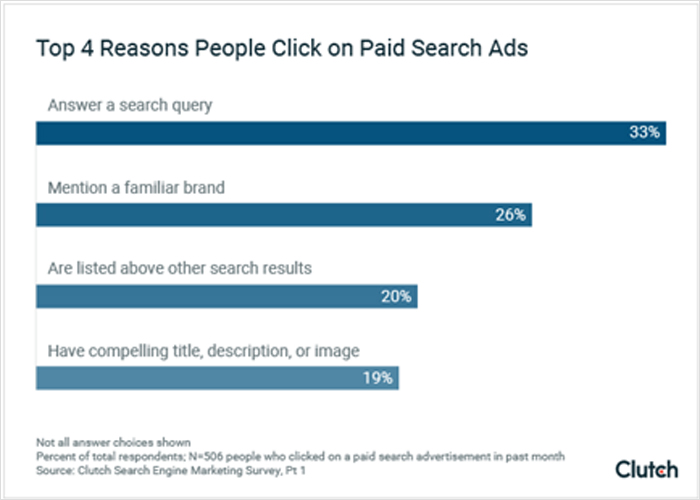
You can then tweak your ad to address the pain points of the customer, making them more likely to buy.
Using Facebook Retargeting ads, you can increase site visits by over 700%!
The first stage is to get them to click on your ad because the same data revealed that the customers are 26% more likely to make a purchase when they do.
Launching Your Facebook Retargeting Campaign
After defining the parameters of your Custom Audience, you can then begin to launch your Facebook retargeting campaign.
Go back to your main business profile page, and move your cursor to the top-right of your screen to select “Create an Ad.”
Simply follow Facebook’s instructions on how to start your campaign, including your budget, your audience, the frequency of your ad, and the schedule to display your ad.
You also need to outline your marketing objective to give Facebook an idea of your business goals. In this way, it can further hone on the types of customers you want to target.
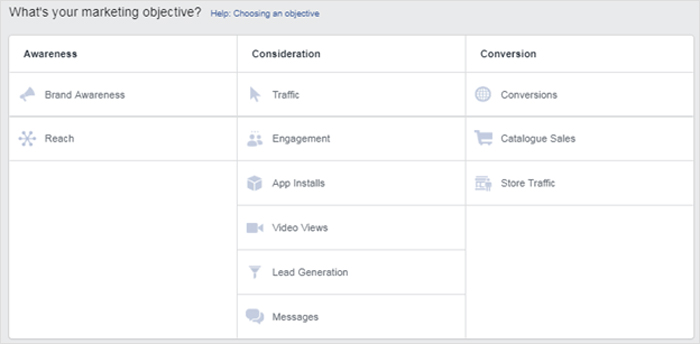
For instance, eCommerce sites are for-profit organizations. Facebook will target the audience not only for their buying capacity but whether or not they are likely to engage with your business.
As you can see from the options, some websites are not interested solely in profits. They may want to expand their brand reach, generate leads, increase engagement, and website traffic.
How Much is Your Budget?
One advantage of Facebook retargeting ads is cost efficiency. Facebook is an affordable platform for marketers to display their dynamic ads.
You can already advertise for as little as $1.00 a day. In fact, it is recommended that you first low-ball Facebook, especially during the early stages.
The idea is to run analytics to determine which among your ads yield the most ROI. You can then rationalize your future budgets and scale winning retargeting campaigns over time.
For instance, you can optimize your poorly performing ads or abandoning them together to focus on your more successful Facebook campaigns.
However, monitor ad frequency carefully.
You need to remember the three primary factors for how Facebook will present your ads to your target/custom audiences:
- The size of the bid
- The level of engagement
- The projected action rates
If ad frequency becomes too high, users experience fatigue, and performance drops.
There is a reason why Facebook created the Lowest Cost option, and it is ideal for:
- Businesses that are trying to keep their ad spending low
- Businesses that want to eke out the most returns for their budget
- Those who do not have specific goalposts for ROI
The Lowest Cost It is not the best determinant of the cost per action (CPA) rate, although Facebook claims that it will try to bring you the cheapest cost results.
The final cost will hinge on the bidding activity. The stiffer the competition, the higher the rates.
A balanced retargeting strategy ensures your remarketing campaign nurtures potential customers without overwhelming them.
Collect Data and Analyze
In digital marketing, the goal is to measure what moves people forward in your marketing funnel—whether they came from your website, email list, or mobile apps—and then double down on what works.
When launching your Facebook retargeting campaigns, make sure to create different types of content.
The idea is to test your ad using trial and error.
Different ads may have different outcomes depending on conditions, target/custom audiences, and frequency.
You can even take the shotgun approach. Launch simultaneous ads at once and see which one sticks. Analytics will give you a good glimpse of where you are successful and which areas you went wrong.
It is better to target your top prospects and customers first rather than deploy your ad to all your customers. You can get better results this way as your data will have less noise.
Conclusion
Facebook Retargeting ads is a novel way to advertise to your prospects without being too creepy about it. It is also a more affordable way to get the word out about your brand and direct your prospects to your sales funnel.
Instead of relying solely on cold traffic, you build intelligent retargeting audiences, guide users through a strategic retargeting funnel, and convert more potential customers with highly relevant ads.
More importantly, do not forget A/B testing on all your Facebook ads to reduce guesswork in your future marketing campaigns.
If you want consistent results from your Facebook ads, start with segmentation, install the pixel, monitor ad frequency, optimize your ad set performance, and continually refine your retargeting strategy.
That’s how modern retargeting campaigns win.
Wedding planners deal with an especially long, emotional consideration window, which makes retargeting even more valuable than usual. Our PPC guide for wedding planners covers how to segment remarketing audiences by which pages engaged couples actually browsed.