
How to Perform B2B Lead Generation on Linkedin
Unlock LinkedIn’s potential to generate high-quality leads and grow your business with proven strategies.

Businesses need a constant flow of reasonably-priced leads to stay ahead. Whether you’re building up a client base or maintaining steady work, lead generation strategies/lead gen marketing are a constant need for marketing efforts. That’s why in this post, we’ll go over the best place to find business-to-business (B2B) leads—LinkedIn through professional LinkedIn ads management.
LinkedIn is the largest global professional network and the number one platform for lead generation. The social network is responsible for 97% of a business’s social media leads, making it 277% more effective for lead gen than Facebook and Twitter. For many organizations, LinkedIn has become a core channel to generate quality leads and build a predictable sales pipeline.
What sets LinkedIn apart from other social networks is its professional community of business-minded members for which it was designed. Over half of LinkedIn members influence or are business decision makers, giving brands direct access to real decision makers with purchasing authority. This means a highly concentrated pool of potential B2B clients and it makes LinkedIn uniquely suited for effective lead generation throughout the entire buying journey.
In this article, we’ll go over the benefits of using LinkedIn for LinkedIn lead generation or B2B leads, outline proven lead generation efforts, and the best local B2B lead generation strategies.
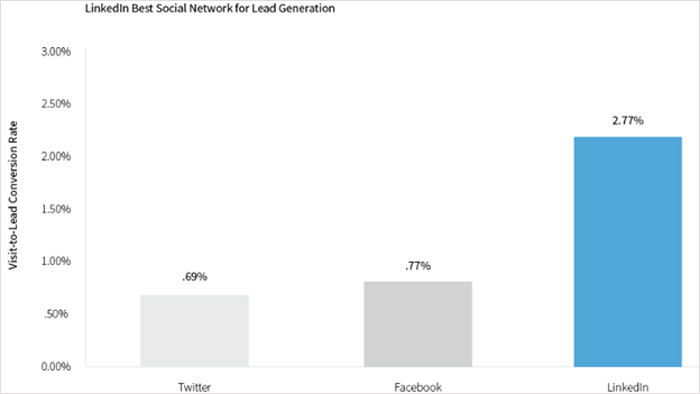
Source: https://business.linkedin.com/marketing-solutions/success/lead-generation
Benefits of using LinkedIn for B2B Lead Generation
LinkedIn is where professionals stay up to date on their company news, industry trends, and industry insights. In addition to its 774+ million members, LinkedIn has over 57 million business and 120,000 school accounts. LinkedIn’s active user base of professionals makes it a goldmine for professional networking and scalable lead gen.
Plus, LinkedIn offers a host of professional data—such as job title, job function, company size, and seniority—and news feed product or service. Because it is geared toward business professionals, LinkedIn enables highly targeted outreach and sits atop all other social media platforms for lead generation strategies. These precise targeting options allow marketers to connect with ideal prospects, improve lead quality, and consistently drive more qualified leads.
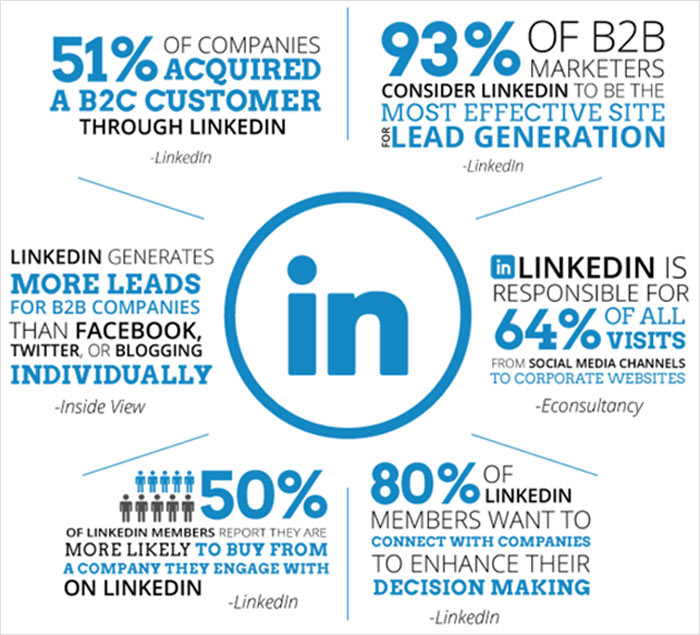
Source: https://neilpatel.com/blog/linkedin-marketing-tips/
LinkedIn Lead Generation Strategies
Generating B2B high quality leads on LinkedIn requires a good strategy. Here are some actionable steps to acing your approach to LinkedIn that blends organic visibility, social selling, and paid ads:
Create a Company Page
When done right, an attractive company page will draw in valuable business and support ongoing lead generation efforts. To create a company page, log in to your LinkedIn account and click the “Work” icon in the top right corner. A drop-down menu will appear, at the bottom of which you’ll find a link to “Create a Company Page.” Press the link and you’ll be asked about your company type, name, details, and so forth. Creating your company page only takes a few minutes.
As you complete your profile, you’ll notice a “Build Your Page” progress bar at the top of the page. Make sure to complete your profile in full as completed pages get 30% more traffic. Fully completed pages receive more traffic and act as trust signals for sales professionals, marketing directors, and customer success managers evaluating your brand.
Don’t only provide basic information and facts about your company. Structure your page in a way that leads to conversions. The tagline should immediately tell visitors what your business offers. Use a clear value proposition, a professional header image, and concise copy that highlights your solutions. The header image should be engaging. And the company description should include a clear and compelling pitch with calls to action (CTAs). Get straight to the pitch in the first two lines since LinkedIn hides the rest under a “see more” button.
Finally, keep updates consistent with engaging content, relevant content, and company content that supports your broader content marketing and thought leadership strategy. An empty updates section shows that you are not engaged on the platform, and sales team-qualified leads will be less likely to trust you.
Create Showcase Pages
Showcase Pages allow you to segment your B2B leads for different products, brands, events, and more. Also known as affiliate pages, Showcase Pages are like LinkedIn’s version of a landing page. These pages act as focused conversion assets that support target accounts and specific target companies. When paired with lead gen forms, Showcase Pages help streamline lead generation and improve conversion rates.
Create a Showcase Page by clicking on the “Admin tools” drop-down menu in the top right corner. Then click “Create a Showcase Page” under “Reach.” From there, you’ll be able to set a showcase page name and URL extension.
Try to keep showcase page names short, so they are not cut off on the sidebar of your company page. Most of all, prime your showcase pages for conversion with succinct descriptions and CTAs.
Join LinkedIn Groups
LinkedIn has over 2 million groups where professionals with similar interests or industry background can share insights and make connections. Joining relevant and active LinkedIn groups is an easy way to grow your network, support relationship building, strengthen business relationships, and reinforce your professional reputation. Groups are ideal for sparking conversations, sharing valuable content, and building trust before any sales pitch or sales call.
You can find groups to join by searching at the top of the homepage. Look for groups that are medium-sized, big enough to be worth your while but small enough for you to be noticed. Keep in mind, LinkedIn only allows you to be a member of 50 groups at most.
After you’ve established yourself as a thought leader, you can even create your own group. This gives you extra admin rights to control who joins or leaves the group and to steer the conversation around a certain topic or industry.
No doubt, groups are an easy way to connect with others in a natural way without sending cold requests.
Use Advanced Search to Find Prospective Clients
So far, we’ve talked about ways to attract high quality leads. But you can also actively seek out prospective clients on LinkedIn. Identify your ideal lead scoring by developing a buyer persona and then use advanced search to find them. A buyer persona is a detailed description of someone who represents your target customer/potential customers.
LinkedIn’s advanced search capabilities and LinkedIn Sales Navigator are essential for advanced prospecting. With LinkedIn’s advanced search and LinkedIn's search filters, you can narrow searches by connection type, jb title, job function, location, company, company size, industry, school, language, recent funding, and more. Plus, you can narrow search results incrementally as you go. That way, you don’t need to start a new search every time you want to tweak the search filters.
If you want to streamline your outreach efforts, save your search criteria on LinkedIn and come back for new search results later. LinkedIn will even send you email alerts when new people match your saved search queries. This can save you a lot of time and effort in the long run.
Sales Navigator enables teams to:
- Find decision makers and find prospects
- Build lists of qualified prospects
- Save searches and receive alerts
- Improve response rates through smarter targeting
For organizations focused on LinkedIn lead gen, sales navigator tools help align outreach with real purchase intent and existing target accounts.
Make Connections
Of course, the purpose of LinkedIn is to make connections.
But don’t just try to connect with anyone. Strive for quality leads connections that are relevant to your business. Effective outreach relies on thoughtful connection requests, especially personalised connection requests. Sometimes members try to connect with anyone just to get to the coveted 500 connections threshold, but it really doesn’t do you any good to have a bunch of mediocre connections and no actual leads. Avoid generic messages and focus on shared context, shared connections, or mutual interests.
So use the advanced search tactics outlined above to find your ideal clients. Always include a personal message with any connection request, so it has the best chance of being accepted. Personalized outreach through the LinkedIn inbox, followed by timely follow ups, improves connection acceptance and supports long-term relationship building with each new prospect. People won’t always accept requests from people they don’t know, so remind them who you are or tell them why they should connect with you.
Publish and Share Content
LinkedIn is not only a networking platform but a publishing platform. You can publish content in regular news feed posts or full articles.
Publishing consistent thought leadership content is one of the strongest drivers of LinkedIn lead generation. A balanced content mix that includes articles, video content, visuals, and data-driven posts helps build trust and social proof. When you post, you can include a photo, video, event, or even a slideshare presentation. You want to keep these short and sweet because users don’t spend much time scrolling through the news feed.
To write an article, simply click on “Write Article” under the “Start a post” bar. You can then write a headline and the body of your article, which can include images, rich media, and hyperlinks. Articles should be around 300-1000 words with catchy headlines that draw the reader in. Once you’ve read the article over a few times and edited for mistakes, click “Publish” to share it.
With both types of content you can determine who will see it, whether anybody on LinkedIn and the web or just your connections.
As for what to publish, publish content that is engaging, takes on industry pain points, and shows your expertise. With enough effort and time, you can become a thought leader in your industry and clients will come to you.
Thought leadership is a major driver of LinkedIn funnel traffic. Consider the following statistics from LinkedIn:
- 75% of would-be buyers say thought leadership helps determine which vendor to put on their short list.
- 79% of would-be buyers point to thought leadership as critical for determining which providers they want to learn more about.
Establishing credibility through daily content is a huge source of B2B leads. To make your voice heard, publish both under your company page profile and under your individual profile as someone representing your company. That way, you can maximize your content exposure on LinkedIn.
Use an editorial calendar to keep a steady flow of content. Try posting at least once a week but strive for once a day if you can. Eventually, your network will learn to look forward to your thoughts and insights.
Whatever you do, make sure your content always adds value to users. You should share innovative and original ideas backed by relevant data. Include visuals like infographics or high-quality leads and photos, anything to capture users’ attention. Discuss action plans that others can follow to show you have real value to offer. An excellent example of this is search engine optimization (SEO) guru Brian Dean. He’ll show off one of his accomplishments and then tell you how he did it:
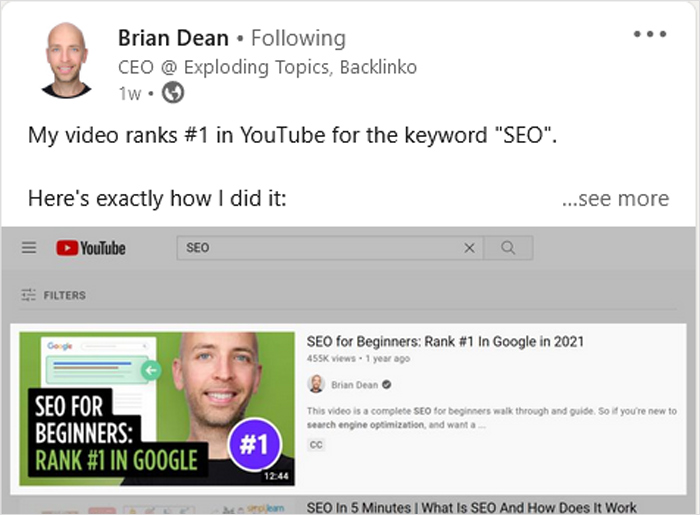
Source: https://www.linkedin.com/in/brianedean/detail/recent-activity/shares/
If you can’t think of what to post about, check out the “what people are talking about now” box on the right side of the homepage for some inspiration. Try striking up new conversations by forecasting future industry pain points or digging into their causes. You can also always share other people’s content that you find especially helpful or insightful. Stay selective with what you share and users will come to appreciate your tailored taste.
Mention influencers to build extra credibility. Cite any conversations you’ve had with other thought leaders whose followings you want to tap into. This can mutually benefit you and them by merging your networks. So look for ways to collaborate with other industry leaders.
End every post with relevant hashtags. LinkedIn adopted hashtags from Twitter to categorize trending topics and improve searches. By including hashtags that relate to your client’s needs, you can attract potential customers or clients searching LinkedIn for that specific topic. But don’t overdo the hashtags. Otherwise, it may come across as tacky. 3 or 4 hashtags are enough.
Finally, don’t forget to reward user engagement on your content by liking and responding to comments and following up on any questions. The more you engage, the more likely users will want to engage with your posts.
Brands that invest in creating content, content sharing, and content marketing often see stronger engagement, better lead quality, and more business opportunities. Sharing and highlighting success stories—and encouraging others to share success stories—helps demonstrate value to both prospects and existing customers.
Advertise on LinkedIn
Like other social networks, LinkedIn offers advertising on their platform. Though LinkedIn advertising is more expensive than advertising on Google or Facebook, it can also be more effective. Most LinkedIn users are already ready to do business. So your ads are already very targeted.
LinkedIn ads are a powerful way to scale lead gen and reach business decision makers directly. To start advertising on LinkedIn, first create a Campaign Manager account by clicking the “Work” icon in the top right corner of the homepage and then selecting “Advertise.” You’ll be asked for an account name, a billing currency, and a LinkedIn Page with which to associate the Campaign Manager account. Then click “Create account.”
The inbound lead generation Campaign/inbound lead generation process Manager will first ask you to choose from the following main objectives: brand awareness, consideration in form of visits and engagement, and conversions via the lead generation process. For the Business to business lead generation process, we recommend selecting conversions as your goal.
From there, you will choose your target audiences filtered by 20 different categories, including location, company, job experience, education, demographics, interest, and traits. You can even create custom audiences with LinkedIn’s Matched Audiences and lead generation tools.
There are four different types of ad format options to choose from: Sponsored Content, Message Ads, Dynamic Ads, and Text Ads:
- Sponsored Content is native advertising that appears among other posts in the news feed as an image, video, or carousel.
- Message Ads allow you to directly message your prospects. This allows for more personalized CTAs to spark immediate action.
- Dynamic Ads use profile data to personalize ads that encourage following a LinkedIn Page or Showcase Page, registering for an event, or applying for a particular job.
- Text Ads are simply text that you can write yourself and tailor to your target audience.
Once you’ve chosen an ad type, you can determine how you want to fund your campaign. LinkedIn offers three pricing options: cost per send (CPS), cost per click (CPC), and cost per impression (CPM):
- CPS is used for Message Ad campaigns and charges you for each successfully delivered message.
- CPC is used for action-oriented campaigns and charges you each time someone engages with your ad.
- CPM is used for brand awareness campaigns and charges every time your ad is seen.
At this point, you can let your ad campaign go live. Track how it performs in the Campaign Manager and make adjustments as needed. You can edit your ads, refine your target audience, and adjust your budget as you go.
When paired with LinkedIn lead gen forms (also known as lead gen forms, gen forms, or gen forms LinkedIn), advertisers can capture leads without sending users away from LinkedIn, improving conversion rates and lowering cost per lead.
Using matched audiences, audience targeting, and automation tools, marketers can run campaign tests, monitor campaign performance, and track progress across their funnel. Many teams combine LinkedIn ads work with Google AdWords, email marketing, and other platforms for a full-funnel approach.
Advertising on LinkedIn can bring in a lot of B2B leads because it’s the network that most professionals use. It’s no wonder that B2B display advertising is projected to keep increasing from 2018 to 2021:

Source: https://www.statista.com/statistics/1256362/linkedin-advertising-b2b-us/
Use LinkedIn Tools
Besides advertising, LinkedIn offers several internal and lead-generation tools to help you manage B2B leads. Check out it’s Conversion Tracking and Sales Navigator, and automated LinkedIn workflows for example. These tools save time, support scalable gen efforts, refine generation forms, optimize marketing campaigns, and continuously drive leads.
On top of that, there are a host of other digital inbound lead generation tools available when it comes to Business to business lead generation. Experiment and find ones that work for you.
Conclusion
LinkedIn lead generation is an ongoing process that blends lead generation, social selling, and strong marketing efforts. With optimized company pages, LinkedIn groups, sales navigator, thoughtful connection requests, compelling thought leadership, and targeted LinkedIn ads, businesses can attract new leads, nurture warm leads, and move prospects smoothly through the buyer’s journey.
If you need help managing your LinkedIn ad campaign, ppc.co can help. Our experts have years of experience using LinkedIn to generate leads. We offer provable return on ad spend, concrete reports, ongoing consulting, flexible plans and pricing, all with a personal touch. Contact us today for a free, comprehensive pay-per-click (PPC) audit and advertising assessment.
Business coaches targeting entrepreneurs and executives have a LinkedIn advantage most other coaching niches don’t — precise targeting by job title, seniority, and company size. See our guide to getting coaching leads through cost-effective PPC campaigns for how LinkedIn fits alongside TikTok and Google in a full coaching ad strategy.
Marketing agencies themselves are a great fit for this exact approach — targeting marketing directors by company size and industry on LinkedIn beats hoping a business owner Googles you at the right moment. See our PPC guide for marketing agencies for how to use LinkedIn as your top-of-funnel channel while Google captures bottom-funnel searches.
Cybersecurity vendors selling to CISOs and IT directors face the same targeting challenge as any B2B seller on LinkedIn. Our PPC guide for cybersecurity markets covers how to layer AI-powered audience modeling on top of role and industry targeting to reach the right decision makers.